Know what your fleet is worth today

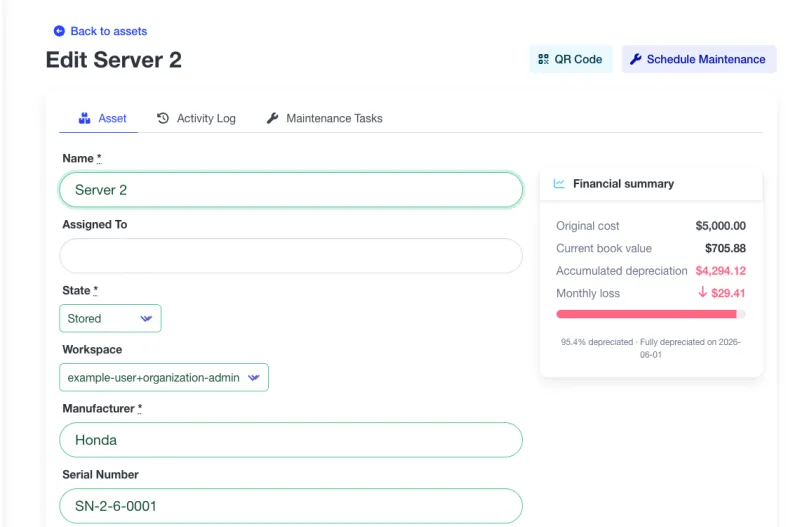
Track the book value of every asset, the monthly depreciation of your fleet, and the replacement budget you'll need in the next 12 months. Managerial depreciation, not tax accounting — built for the people running the equipment, not the people filing returns.

Financial data visible to organization admins only.

Admin view
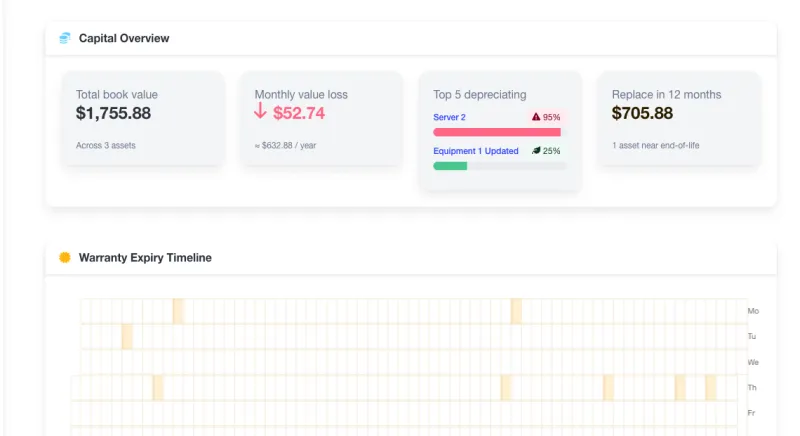
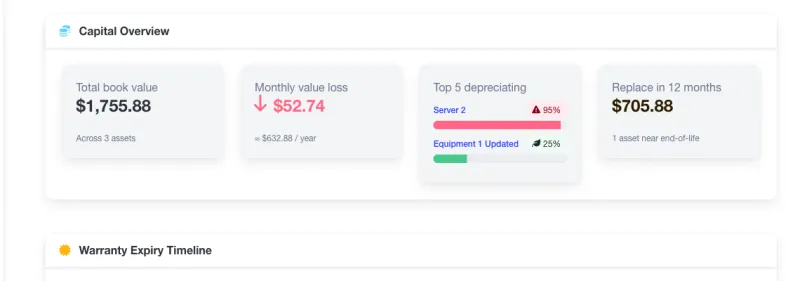
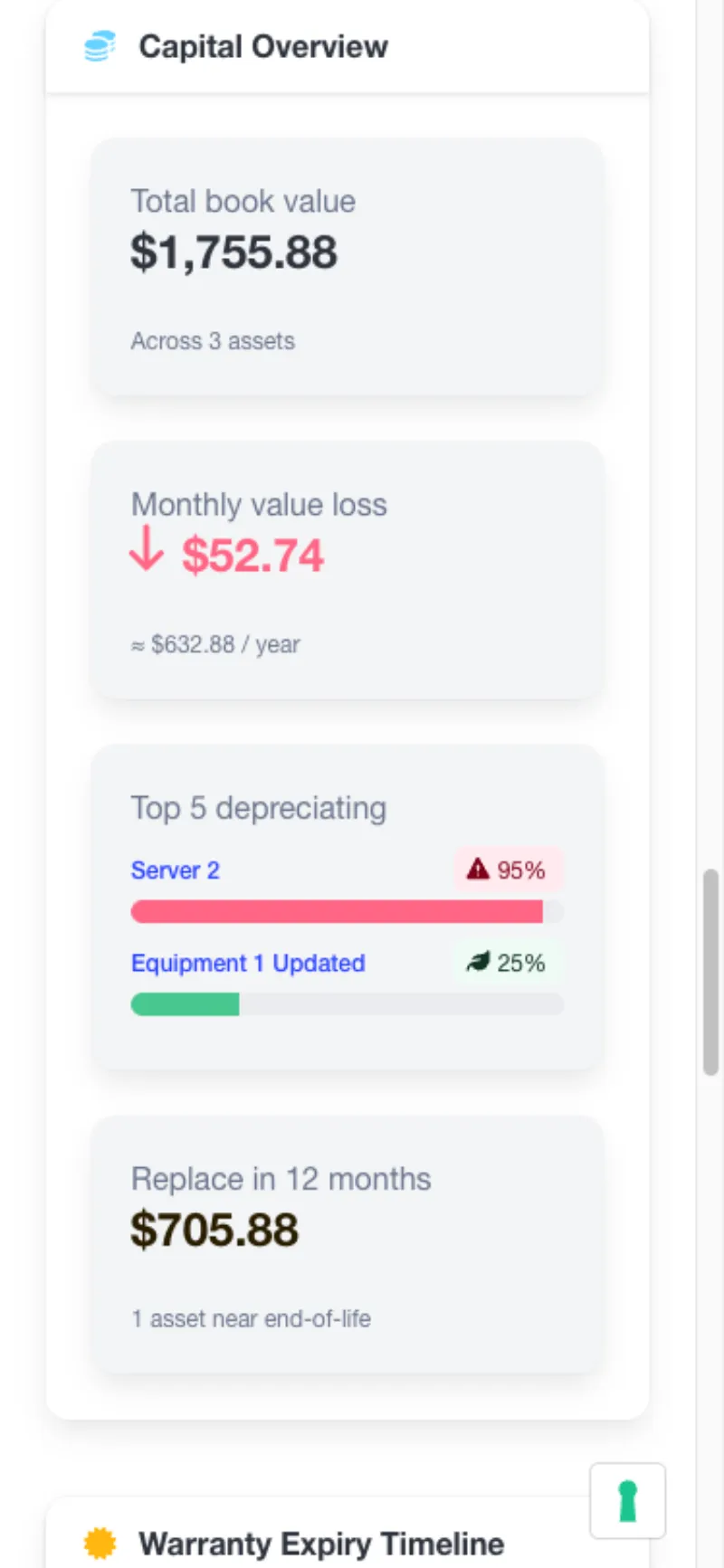
A4B dashboard Capital Overview widget showing total book value of $284,500, monthly depreciation of $3,400, top 5 depreciating assets, and a 12-month replacement budget band

Three reasons maintenance teams still guess at asset value

Every facility has this problem. Most solve it with a spreadsheet that's out of date by the time it gets forwarded.

Spreadsheets go stale

Someone updates the depreciation sheet once a year — and it's already wrong the next month. New assets show up. Old assets get retired. Book values slide. The spreadsheet doesn't.

Purchase price ≠ today's value

A $40,000 generator bought in 2019 is not a $40,000 asset today. When a finance team asks what the fleet is worth, 'what we paid for it' is the wrong answer — but often the only one the maintenance team has.

Budget season surprises

Three machines reach end-of-life the same quarter and no one flagged it six months earlier. The replacement ask lands on the CFO's desk with zero runway, and the answer is 'next year'.

What you see the minute you log in

A single Capital Overview widget on your dashboard shows the four numbers operations leaders actually ask for.

Total fleet book value

Sum of current book value across every configured asset. Updates daily — no spreadsheet, no cron, no refresh button.

Monthly depreciation

How much value your fleet loses every month, in your organization's currency. A real number to put in next year's budget.

Example: ₴126,000 / month

Top 5 depreciating assets

Ranked by percent-of-life-used. The assets closest to retirement surface first — before they surprise you.

12-month replacement budget

Sum of book values for assets projected to reach 95% depreciation in the next 12 months. A defensible capex ask, straight from your CMMS.

Only admins see the money. Purchase prices, book values, and monthly depreciation are visible to organization and workspace admins only. Technicians and operators see maintenance data; admins see the capital picture. This mirrors how your finance team treats the data today — no extra permission model to learn.

All figures are computed on demand from your live asset data. No valuation snapshots, no nightly job, no ETL.

Managerial depreciation, built for small teams

Two methods, one org-configurable rate, opt-in per asset. No accountant required to turn it on.

Straight-Line or Declining-Balance

Pick the method per asset. Straight-line for vehicles, buildings, predictable wear. Declining-balance for IT, electronics, anything that loses value fastest in year one. Switch any time — the history recomputes automatically.

Org-configurable Declining-Balance rate (100–300%)

Default is 200% (double-declining, US GAAP standard). Change it once per organization and every declining-balance asset recomputes. No per-asset tax-rate voodoo.

Opt-in per asset. No upsell.

Three fields per asset: purchase price, useful life in months, method. Leave them blank and the asset is simply excluded from the fleet book value — no errors, no warnings, no upsell. Capital overview ships on Free.

Ready to see what your fleet is worth?

Included on every plan. Capacity limits apply — features don't.

Capital Overview & Depreciation — FAQ

Straight answers about how book value, depreciation methods, and admin-only visibility work in A4B.

Is this GAAP, IFRS, or MACRS compliant?
No — and that's deliberate. A4B ships managerial-accounting depreciation: Straight-Line and Declining-Balance, for internal decisions like budgeting and replacement planning. We don't do MACRS (US tax), AIA (UK tax), or PKU (Ukrainian tax groups) because your accountant already does, and small teams don't need us to duplicate that work inside their CMMS. If you need tax-compliant depreciation, export the data to your accounting system — every field is in the CSV export.
How does A4B rank the 'Top depreciating' assets?
Assets are ranked by percent-of-useful-life-used — the higher the percentage, the closer the asset is to the end of its configured useful life. A 60-month asset at month 48 ranks above a 120-month asset at month 48, because the first is 80% used and the second is 40%. This surfaces the assets most likely to need replacement soonest, regardless of original cost.
Can I turn depreciation off for a specific asset?
Yes — depreciation is opt-in per asset. Just leave the three fields blank (purchase price, useful life, method), or clear them after the fact. Assets without complete depreciation configuration simply don't appear in fleet book value, monthly depreciation, or replacement budget calculations. Donated equipment, pre-owned gear, or items with unknown purchase history stay out of the math without affecting everything else.
What does 'admin-only' actually mean here?
Purchase prices, book values, monthly depreciation figures, and the Capital Overview widget itself are visible to organization admins and workspace admins only. Regular members — the technicians and operators doing the maintenance work — see the asset's identity, state, and maintenance history, but never the financial figures. This is the same role gate that already applies to purchase price today; we don't introduce a new permission model. The MCP server and the CSV export both honor the same rule.
Does A4B support declining-balance rates other than 200%?
Yes. The declining-balance rate is configurable per organization from 100% (straight-line equivalent) to 300% (triple-declining). The default is 200% (double-declining — the US GAAP standard). Change it once in organization settings and every asset using the declining-balance method recomputes automatically. The rate is org-level on purpose — mixing per-asset rates is where spreadsheet-based depreciation typically breaks.
Do you support Units-of-Production or usage-based depreciation?
Not yet. The v1 feature covers Straight-Line and Declining-Balance, which work when useful life is measured in months. Units-of-Production (depreciation based on hours of runtime, kilometers driven, or cycles completed) requires a separate meter-readings data model and is tracked as a planned follow-up. If your fleet genuinely depreciates by usage rather than time — mining haul trucks, commercial aviation, high-volume production lines — let us know so we can prioritize accordingly.

Ready to know what your fleet is worth?

Built for Professional Asset Management

Trusted capabilities that modern maintenance teams rely on

Enterprise Security

Encrypted data & daily backups

Cloud Hosted

Professional infrastructure

Team Focused

Built for collaboration

Mobile Ready

Works anywhere, any device

Ready to modernize your maintenance approach?