Instant Asset Identification with QR Code Labels

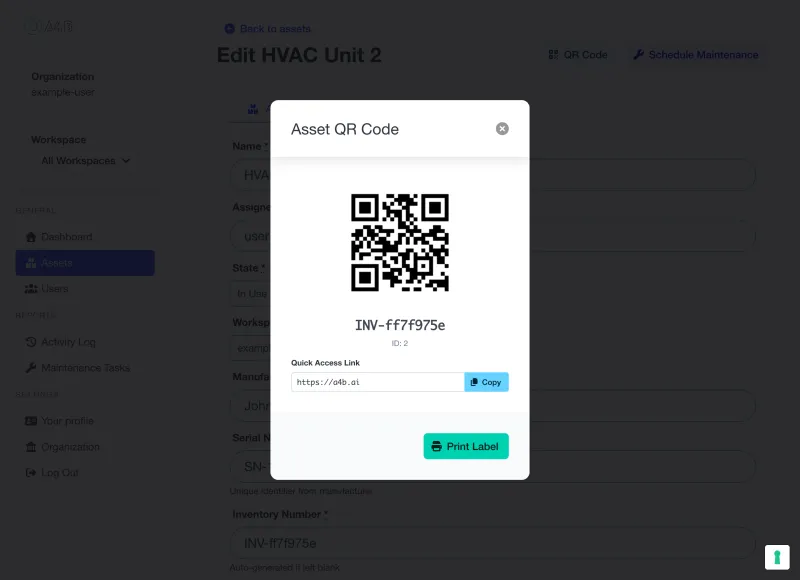
Print QR code labels, affix them to your equipment, and scan with any smartphone camera. No app required. Access asset details, maintenance history, and work orders in under 2 seconds.

A4B CMMS QR code modal showing scannable QR code for HVAC Unit with inventory number and print label option

Why QR Code Labels?

Eliminate manual data entry errors and give your team instant access to critical asset information right from the floor.


Instant Access

Scan to view asset details in under 2 seconds. No searching through spreadsheets or systems. Point your phone, scan, and you're there.

Zero Data Entry Errors

Eliminate manual transcription mistakes. QR codes link directly to the asset record. No typos, no wrong assets, no wasted time.

Works on Any Phone

No special app required. Any smartphone camera built after 2017 can scan QR codes natively. iPhone, Android, it just works.

Ready to streamline asset identification?

Join maintenance teams already saving time with QR code labels

Three Label Sizes for Every Use Case

Choose the right size for your equipment and environment.

Small Labels

1" x 1" (25mm x 25mm)

Perfect for small tools, hand equipment, and items where space is limited. Fits on power tools, measuring instruments, and portable devices.

Recommended

Standard Labels

2" x 1" (Avery 5160)

Our most versatile size. Compatible with standard Avery 5160 label sheets. Ideal for IT equipment, office assets, and general inventory.

Large Labels

4" x 2" (100mm x 50mm)

High visibility for large equipment, machinery, and outdoor assets. Easy to scan from a distance. Perfect for warehouse and manufacturing environments.

HYPOTHETICAL SCENARIO

Real-World Impact: 75% Faster Asset Lookup

Illustrative example based on industry research

The Challenge

A regional warehouse with 500+ assets struggled with manual identification:

  • Average 3-5 minutes to locate asset information in the system
  • Frequent errors from manual serial number entry
  • Maintenance technicians wasting time searching for asset history
  • Paper-based asset tags fading, falling off, or becoming unreadable

The Solution

Implemented A4B CMMS QR code labels across all warehouse assets:

  • Printed bulk QR labels for all 500 assets in one afternoon
  • Standard 2"x1" labels on IT equipment, large 4"x2" on machinery
  • Technicians equipped with company smartphones for scanning
  • Integrated with existing maintenance workflow

The Results (3 months)

75% reduction in asset lookup time (45 seconds vs 3 minutes)

90% reduction in data entry errors

(Direct QR scan vs manual serial entry)

Maintenance technicians report higher job satisfaction

Full ROI achieved within first month

"The QR labels transformed how our team works. Instead of hunting through spreadsheets, they scan and go. It's that simple."

- Warehouse Operations Manager

FTC-Compliant Disclaimer: This is a hypothetical scenario based on industry research. Actual results vary based on organizational complexity, asset types, and implementation quality.

Sources: Industry research on asset identification efficiency, barcode/QR implementation studies, and warehouse management best practices.

QR Code Labels Across Industries

Warehousing & Logistics

  • Forklifts & Equipment: Large labels for quick scanning during daily inspections
  • Pallet Racks & Locations: Standard labels for inventory location tracking
  • Impact: 50-75% faster asset identification, reduced inventory errors

Manufacturing

  • Production Equipment: Large labels on CNC machines, conveyors, and assembly stations
  • Tools & Dies: Small labels on specialized tooling with maintenance schedules
  • Impact: Instant access to maintenance history, calibration dates, and specifications

Healthcare

  • Medical Equipment: Standard labels on diagnostic devices, monitors, and portable equipment
  • Compliance: Quick access to calibration records and regulatory documentation
  • Impact: Audit-ready asset documentation, improved patient safety

Facilities Management

  • HVAC Systems: Large labels on rooftop units, air handlers, and control panels
  • Building Assets: Standard labels on elevators, fire systems, and electrical panels
  • Impact: Faster response to tenant requests, complete service history at your fingertips

Before vs After QR Code Labels

Before: Manual Asset Lookup

  • Search through spreadsheets to find asset ID
  • Manually type serial numbers (risk of typos)
  • Walk back to office to access system
  • Call coworker to look up information
  • Frustrated technicians, wasted time

After: QR Code Scanning

  • Point phone camera at QR label
  • Instant link to asset record (no typing)
  • Access full history right from the floor
  • Self-service information at your fingertips
  • Happy technicians, efficient workflows

The difference between searching and scanning is the difference between wasted time and productive work.

Start Printing QR Labels in Minutes

Already have assets in A4B? Print your first labels today.

Step 1: Select assets. Step 2: Choose label size. Step 3: Print.
It's that simple. No credit card required.

QR Code Labels FAQ

Common questions about using QR code labels for asset identification

What label sizes are available?
We offer three label sizes: Small (1"x1") for hand tools and small equipment, Standard (2"x1" - Avery 5160 compatible) for most IT and office equipment, and Large (4"x2") for machinery and large equipment that needs to be scanned from a distance.
What printer do I need?
Any standard office laser or inkjet printer works. For best results with the Avery 5160 standard labels, we recommend using genuine Avery label sheets available at any office supply store. No special equipment required.
Do I need a special app to scan QR codes?
No app required! Any smartphone built after 2017 can scan QR codes using the native camera app. Simply point your camera at the QR code and tap the notification that appears. Works on iPhone, Android, and other smartphones.
Who can view asset information when scanning?
QR codes link to secure asset pages. Only authenticated team members with appropriate workspace permissions can view asset details. Unauthorized users see a login prompt. Your asset data remains protected.
Can I print labels for multiple assets at once?
Yes! Select multiple assets from your asset list, choose your label size, and print all labels in a single batch. Perfect for initial rollout or when adding new equipment to your inventory.
How do I get started with QR labels?
After adding assets to A4B, go to your asset list, select the assets you want to label, click 'Print QR Labels', choose your label size, and print. Affix labels to equipment and you're ready to scan. The whole process takes just a few minutes.

Ready to start labeling your assets?

Built for Professional Asset Management

Trusted capabilities that modern maintenance teams rely on

Enterprise Security

Encrypted data & daily backups

Cloud Hosted

Professional infrastructure

Team Focused

Built for collaboration

Mobile Ready

Works anywhere, any device

Ready to modernize your maintenance approach?